


Latest Professional-Cloud-Network-Engineer Actual Free Exam Updated 236 Questions
Online Questions - Valid Practice Professional-Cloud-Network-Engineer Exam Dumps Test Questions
NEW QUESTION # 115
You are troubleshooting an issue where your organization's Cloud HA VPN is disconnected from your on- premises router for approximately 10 seconds before reestablishing the tunnel. The issue regularly occurs every few hours. You notice that the HA VPN logs show an entry of Received SA_DELETE when this issue occurs. You need to resolve this issue and prevent future VPN downtime from impacting your production applications. What should you do?
- A. Q Update the on-premises router's BGP router ID to reflect the link-local IP peer address assigned by Cloud Router.
- B. Q Update the on-premises router's Phase 1 and Phase 2 lifetime IKE parameters to match the values in the Cloud HA VPN documentation.
- C. Q Update the pre-shared key (PSK) of the on-premises router's VPN tunnel configuration to match the PSK of the Cloud HA VPN.
- D. Q Update the on-premises router's Diffie-Hellman groups and cipher proposal list to match the values in the Cloud HA VPN documentation.
Answer: B
Explanation:
The SA_DELETE message in VPN logs, especially when followed by a re-establishment, is a strong indicator that the Security Association (SA) lifetimes for Phase 1 (IKE SA) or Phase 2 (IPsec SA) are mismatched between the Google Cloud HA VPN and the on-premises router. When one side's SA expires, it sends an SA_DELETE message to the peer, which then triggers a rekeying process. If the lifetimes don't match, one side might prematurely terminate the SA, leading to brief disconnections. Ensuring that the IKE parameters (specifically Phase 1 and Phase 2 lifetimes) match the recommended values in the Cloud HA VPN documentation is crucial for stable tunnel operation.
Exact Extract:
"If your VPN tunnel frequently disconnects and reconnects, and you see SA_DELETE messages in your logs, it often indicates a mismatch in the Phase 1 (IKE SA) and Phase 2 (IPsec SA) lifetimes configured on your on- premises VPN gateway and the Cloud VPN gateway."
"For optimal stability, ensure that the IKE lifetime and ESP/IPsec lifetime parameters on your on-premises VPN device exactly match the recommended values provided in the Cloud VPN documentation. Mismatched lifetimes can cause tunnels to rekey prematurely or fall out of sync, leading to temporary disconnections." Reference: Google Cloud VPN Documentation - Troubleshooting VPN issues, Recommended IKE and IPsec settings
NEW QUESTION # 116
You are adding steps to a working automation that uses a service account to authenticate. You need to drive the automation the ability to retrieve files from a Cloud Storage bucket. Your organization requires using the least privilege possible.
What should you do?
- A. Grant the cloud-platform privilege to the service account for the Cloud Storage bucket.
- B. Grant the compute.instanceAdmin to your user account.
- C. Grant the iam.serviceAccountUser to your user account.
- D. Grant the read-only privilege to the service account for the Cloud Storage bucket.
Answer: D
NEW QUESTION # 117
You are deploying a global external TCP load balancing solution and want to preserve the source IP address of the original layer 3 payload.
Which type of load balancer should you use?
- A. HTTP(S) load balancer
- B. Internal load balancer
- C. TCP/SSL proxy load balancer
- D. Network load balancer
Answer: C
Explanation:
By default TCP/SSL proxy load balancer original client IP address and port information is not preserved, but it can be preserved using the PROXY protocol: https://cloud.google.com/load-balancing/docs/tcp#target-proxies
https://medium.com/google-cloud/preserving-client-ips-through-google-clouds-global-tcp-and-ssl-proxy-load-balancers-3697d76feeb1
NEW QUESTION # 118
You are responsible for enabling Private Google Access for the virtual machine (VM) instances in your Virtual Private Cloud (VPC) to access Google APIs. All VM instances have only a private IP address and need to access Cloud Storage. You need to ensure that all VM traffic is routed back to your on-premises data center for traffic scrubbing via your existing Cloud Interconnect connection. However, VM traffic to Google APIs should remain in the VPC. What should you do?
- A. Configure your on-premises router to advertise 0.0.0.0/0 via Border Gateway Protocol (BGP) with a lower priority (MED) than the default VPC route.
Create a private Cloud DNS zone for googleapis.com, create a CNAME for * googieapis.com to private googleapis com, and create an A record for private.googleapis.com that resolves to the addresses in 199
.36.153.8/30.
Create a static route in your VPC for the range 199.36. 153.8/30 with the default internet gateway as the next hop. - B. Delete the default route in your VPC and configure your on-premises router to advertise 0.0.0.0/0 via Border Gateway Protocol (BGP).
Create a public Cloud DNS zone with a CNAME for *.google.com to private googleapis com, create a CNAME for * googleapis.com to private googleapis com, and create an A record for Private googleapis.
com that resolves to the addresses in 199.36.153 8/30.
Create a static route in your VPC for the range 199 .36.153.8/30 with the default internet gateway as the next hop. - C. Delete the default route in your VPC.
Create a private Cloud DNS zone for googleapis.com, create a CNAME for *.googleapis.com to restricted googleapis.com, and create an A record for restricted googleapis com that resolves to the addresses in 199.36.153.4/30.
Create a static route in your VPC for the range 199.36.153.4/30 with the default internet gateway as the next hop. - D. Delete the default route in your VPC and configure your on-premises router to advertise 0.0.0.0/0 via Border Gateway Protocol (BGP).
Create a private Cloud DNS zone for googleapis.com, create a CNAME for * googieapis.com to Private googleapis.com, and create an A record for private.googleapis.com that resolves to the addresses in
199.36.153.8/30.Create a static route in your VPC for the range 199.36.153.8/30 with the default internet gateway as the next hop.
Answer: A
NEW QUESTION # 119
Your company offers a popular gaming service. Your instances are deployed with private IP addresses, and external access is granted through a global load balancer. You believe you have identified a potential malicious actor, but aren't certain you have the correct client IP address. You want to identify this actor while minimizing disruption to your legitimate users.
What should you do?
- A. Create a Cloud Armor Policy rule that denies traffic and review necessary logs.
- B. Create a Cloud Armor Policy rule that denies traffic, enable preview mode, and review necessary logs.
- C. Create a VPC Firewall rule that denies traffic, enable logging and set enforcement to disabled, and review necessary logs.
- D. Create a VPC Firewall rule that denies traffic, enable logging and set enforcement to enabled, and review necessary logs.
Answer: D
NEW QUESTION # 120
Your organization wants to set up hybrid connectivity with VLAN attachments that terminate in a single Cloud Router with 99.9% uptime. You need to create a network design for your on-premises router that meets those requirements and has an active/passive configuration that uses only one VLAN attachment at a time. What should you do?
- A. Create a design that uses a BGP multi-exit discriminator (MED) attribute to influence the egress path from Google Cloud to the on-premises environment.
- B. Create a design that uses the local_pref BGP attribute to influence the egress path from Google Cloud to the on-premises environment.
- C. Create a design that uses the as_path BGP attribute to influence the egress path from Google Cloud to the on-premises environment.
- D. Create a design that uses an equal-cost multipath (ECMP) with flow-based hashing on your on-premises devices.
Answer: A
Explanation:
The BGP multi-exit discriminator (MED) attribute is used in BGP configurations to influence the choice of path in an active/passive setup by prioritizing one path over another for egress traffic. This is ideal for a design that uses only one VLAN attachment at a time.
NEW QUESTION # 121
You are disabling DNSSEC for one of your Cloud DNS-managed zones. You removed the DS records from your zone file, waited for them to expire from the cache, and disabled DNSSEC for the zone. You receive reports that DNSSEC validating resolves are unable to resolve names in your zone.
What should you do?
- A. Transfer ownership of the domain to a new registar.
- B. Set the zone to the TRANSFER state.
- C. Update the TTL for the zone.
- D. Disable DNSSEC at your domain registar.
Answer: D
Explanation:
Before disabling DNSSEC for a managed zone you want to use, you must deactivate DNSSEC at your domain registrar to ensure that DNSSEC-validating resolvers can still resolve names in the zone.
https://cloud.google.com/dns/docs/dnssec-config
NEW QUESTION # 122
You have recently taken over responsibility for your organization's Google Cloud network security configurations. You want to review your Cloud Next Generation Firewall (Cloud NGFW) configurations to ensure that there are no rules allowing ingress traffic to your VMs and services from the internet. You want to avoid manual work. What should you do?
- A. Use Firewall Insights, and enable insights for overly permissive rules.
- B. Export all your Cloud NGFW rules into a CSV file and search for 0.0.0.0/0.
- C. Run Connectivity Tests from multiple external sources to confirm that traffic is not allowed to ingress to your most critical services in Google Cloud.
- D. Review Network Analyzer insights on the VPC network category.
Answer: A
Explanation:
Explanation: Using Firewall Insights and enabling insights for overly permissive rules helps automate the process of identifying firewall rules that may allow unintended ingress from the internet. This is a quick and efficient method compared to manually searching through firewall configurations.
NEW QUESTION # 123
Question:
You are troubleshooting connectivity issues between Google Cloud and a public SaaS provider. Connectivity between the two environments is through the public internet. Your users are reporting intermittent connection errors when using TCP to connect; however, ICMP tests show no failures. According to users, errors occur around the same time every day. You want to troubleshoot and gather information by using Google Cloud tools that are most likely to provide insights into what is occurring within Google Cloud. What should you do?
- A. Enable the Firewall insights API. Set the deny rule insights observation period to one day. Review the insights to assure there are no firewall rules denying traffic.
- B. Enable and review Cloud Logging on your Cloud NAT gateway. Look for logs with errors matching the destination IP address of the public SaaS provider.
- C. Enable and review Cloud Logging for Cloud Armor. Look for logs with errors matching the destination IP address of the public SaaS provider.
- D. Create a Connectivity Test by using TCP, the source IP address of your test VM, and the destination IP address of the public SaaS provider. Review the live data plane analysis and take the next steps based on the test results.
Answer: D
Explanation:
When troubleshooting connectivity issues, especially over public internet connections with intermittent errors, Connectivity Tests in Network Intelligence Center are crucial. This tool allows you to simulate the connectivity and understand the data plane status of Google Cloud resources. Since ICMP tests pass but TCP tests fail intermittently, using Connectivity Tests with TCP parameters will provide detailed insight into possible network issues like route misconfigurations, peering issues, or other transient problems affecting only specific protocols.
Reference: Google Cloud - Network Intelligence Center
Reference: Google Cloud - Troubleshooting with Connectivity Tests
NEW QUESTION # 124
You need to create the network infrastructure to deploy a highly available web application in the us-east1 and us-west1 regions. The application runs on Compute Engine instances, and it does not require the use of a database. You want to follow Google-recommended practices. What should you do?
- A. Create one VPC in each region, and peer both VPCs.
Create a global load balancer.
Enable Cloud CDN on the load balancer.
Create a CNAME for the load balancer in Cloud DNS. - B. Create one VPC with one subnet in each region.
Create a regional network load balancer in each region with a static IP address.
Enable Cloud CDN on the load balancers.
Create an A record in Cloud DNS with both IP addresses for the load balancers. - C. Create one VPC with one subnet in each region.
Create a global load balancer with a static IP address.
Enable Cloud CDN and Google Cloud Armor on the load balancer.
Create an A record using the IP address of the load balancer in Cloud DNS. - D. Create one VPC with one subnet in each region.
Create an HTTP(S) load balancer with a static IP address.
Choose the standard tier for the network.
Enable Cloud CDN on the load balancer.
Create a CNAME record using the load balancer's IP address in Cloud DNS.
Answer: A
NEW QUESTION # 125
You need to restrict access to your Google Cloud load-balanced application so that only specific IP addresses can connect.
What should you do?
- A. Create a secure perimeter using the Access Context Manager feature of VPC Service Controls and restrict access to the source IP range of the allowed clients and Google health check IP ranges.
- B. Label the backend instances "application," and create a firewall rule with the target label "application" and the source IP range of the allowed clients and Google health check IP ranges.
- C. Create a secure perimeter using VPC Service Controls, and mark the load balancer as a service restricted to the source IP range of the allowed clients and Google health check IP ranges.
- D. Tag the backend instances "application," and create a firewall rule with target tag "application" and the source IP range of the allowed clients and Google health check IP ranges.
Answer: D
Explanation:
https://link.springer.com/chapter/10.1007/978-1-4842-1004-8_4
NEW QUESTION # 126
Your on-premises data center has 2 routers connected to your GCP through a VPN on each router. All applications are working correctly; however, all of the traffic is passing across a single VPN instead of being load-balanced across the 2 connections as desired.
During troubleshooting you find:
*Each on-premises router is configured with the same ASN.
*Each on-premises router is configured with the same routes and priorities.
*Both on-premises routers are configured with a VPN connected to a single Cloud Router.
*The VPN logs have no-proposal-chosen lines when the VPNs are connecting.
*BGP session is not established between one on-premises router and the Cloud Router.
What is the most likely cause of this problem?
- A. BGP sessions are not established between both on-premises routers and the Cloud Router.
- B. You do not have a load balancer to load-balance the network traffic.
- C. One of the VPN sessions is configured incorrectly.
- D. A firewall is blocking the traffic across the second VPN connection.
Answer: C
Explanation:
If the VPN logs show a no-proposal-chosen error, this error indicates that Cloud VPN and your peer VPN gateway were unable to agree on a set of ciphers. For IKEv1, the set of ciphers must match exactly. For IKEv2, there must be at least one common cipher proposed by each gateway. Make sure that you use supported ciphers to configure your peer VPN gateway. https://cloud.google.com/network-connectivity/docs
/vpn/support/troubleshooting#:~:text=If%20the%20VPN%20logs%20show,of%20ciphers%20must%
20match%20exactly.&text=Make%20sure%20that%20you%20use,configure%20your%20peer%20VPN%
20gateway.
NEW QUESTION # 127
Your organization has a hub and spoke architecture with VPC Network Peering, and hybrid connectivity is centralized at the hub. The Cloud Router in the hub VPC is advertising subnet routes, but the on-premises router does not appear to be receiving any subnet routes from the VPC spokes. You need to resolve this issue.
What should you do?
- A. Create custom routes at the Cloud Router in the spokes to advertise the subnets of the VPC spokes.
- B. Create custom routes at the Cloud Router in the hub to advertise the subnets of the VPC spokes.
- C. Create custom learned routes at the Cloud Router in the hub to advertise the subnets of the VPC spokes.
- D. Create a BGP route policy at the Cloud Router, and ensure the subnets of the VPC spokes are being announced towards the on-premises environment.
Answer: D
Explanation:
Explanation: Creating a BGP route policy at the Cloud Router ensures that the subnets of the VPC spokes are properly advertised to the on-premises environment. This allows the on-premises router to receive and use those routes. Without the correct BGP policies, route advertisement may not happen as expected.
: Google Cloud BGP Route Configuration
NEW QUESTION # 128
You have the following private Google Kubernetes Engine (GKE) cluster deployment: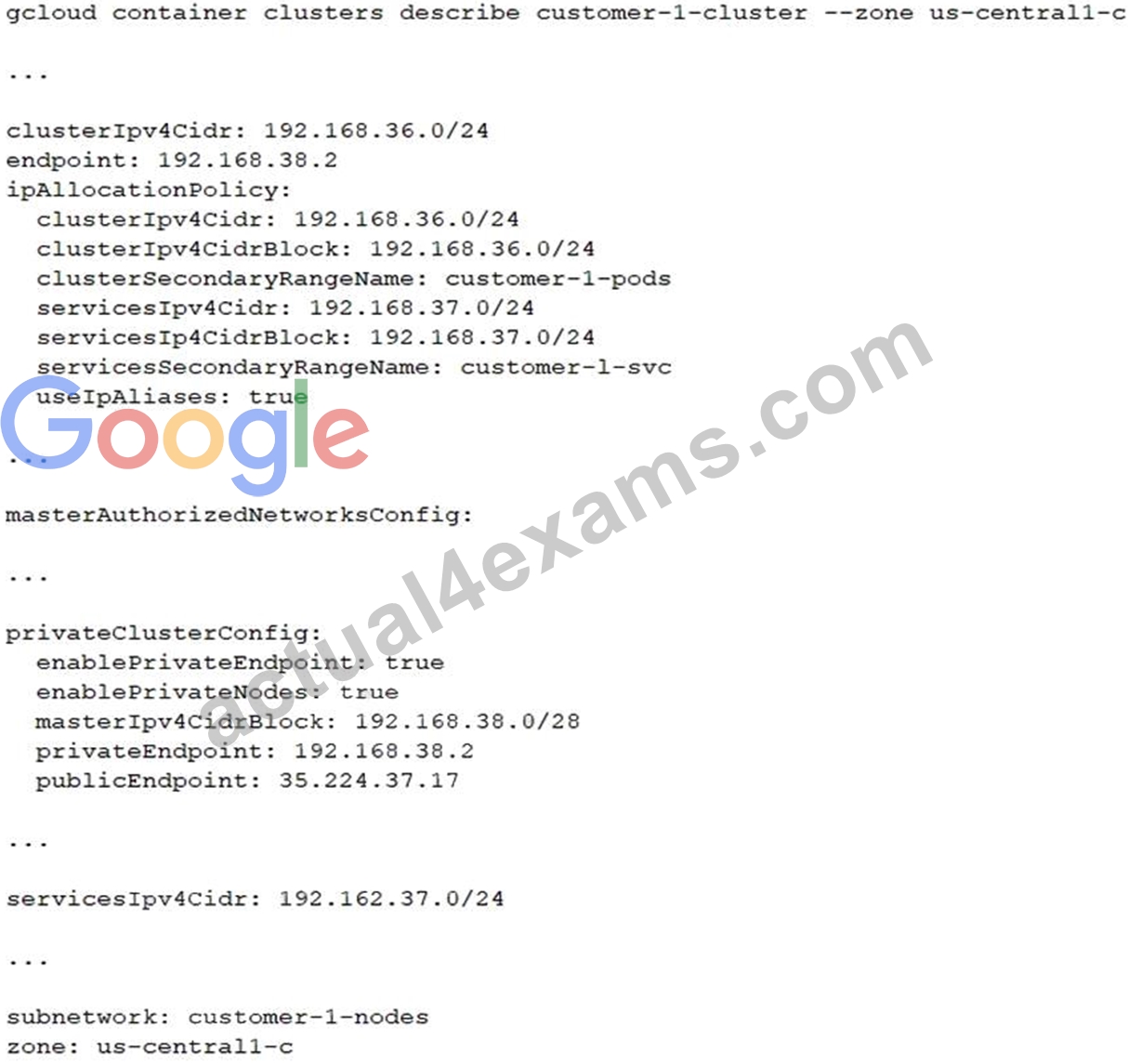
You have a virtual machine (VM) deployed in the same VPC in the subnetwork kubernetes-management with internal IP address 192.168.40 2/24 and no external IP address assigned. You need to communicate with the cluster master using kubectl. What should you do?
- A. Add the network 192.168.40.0/24 to the masterAuthorizedNetworksConfig. Configure kubectl to communicate with the endpoint 192.168.38.2.
- B. Add an external IP address to the VM, and add this IP address in the masterAuthorizedNetworksConfig. Configure kubectl to communicate with the endpoint 35.224.37.17.
- C. Add the network 192.168.38.0/28 to the masterAuthorizedNetworksConfig. Configure kubectl to communicate with the endpoint 192.168.38.2
- D. Add the network 192.168.36.0/24 to the masterAuthorizedNetworksConfig. Configure kubectl to communicate with the endpoint 192.168.38.2
Answer: A
NEW QUESTION # 129
Your organization recently re-architected your cloud environment to use Network Connectivity Center.
However, an error occurred when you tried to add a new VPC named vpc-dev as a spoke. The error indicated that there was an issue with an existing spoke and the IP space of a VPC named vpc-pre-prod. You must complete the migration quickly and efficiently. What should you do?
- A. Remove the conflicting VPC spoke for vpc-pre-prod from the set of VPC spokes in Network Connectivity Center. Add the VPC spoke for vpc-dev. Add the previously removed vpc-pre-prod as a VPC spoke.
- B. Exclude the conflicting IP range by using the --exclude-export-ranges flag in the hub when attaching the VPC spoke for vpc-dev.
- C. Exclude the conflicting IP range by using the --exclude-export-ranges flag when creating the VPC spoke for vpc-dev.
- D. Delete the VMs associated with the conflicting subnets, then delete the conflicting subnets in vpc-dev.
Recreate the subnets with a new IP range and redeploy the previously deleted VMs in the new subnets.
Add the VPC spoke for vpc-dev.
Answer: A
Explanation:
Explanation: The most efficient way to resolve the conflict is to temporarily remove the conflicting vpc-pre- prod spoke, add the vpc-dev spoke, and then re-add vpc-pre-prod. This ensures that the migration happens quickly without the need to change IP ranges or delete resources.
NEW QUESTION # 130
Question:
Your organization has a hub and spoke architecture with VPC Network Peering, and hybrid connectivity is centralized at the hub. The Cloud Router in the hub VPC is advertising subnet routes, but the on-premises router does not appear to be receiving any subnet routes from the VPC spokes. You need to resolve this issue.
What should you do?
- A. Create a BGP route policy at the Cloud Router, and ensure the subnets of the VPC spokes are being announced towards the on-premises environment.
- B. Create custom routes at the Cloud Router in the spokes to advertise the subnets of the VPC spokes.
- C. Create custom learned routes at the Cloud Router in the hub to advertise the subnets of the VPC spokes.
- D. Create custom routes at the Cloud Router in the hub to advertise the subnets of the VPC spokes.
Answer: C
Explanation:
Creating custom learned routes at the hub's Cloud Router is required for advertising VPC spokes' subnets to the on-premises environment. This centralizes route configuration and ensures that all spoke subnet routes are propagated to the hybrid network.
NEW QUESTION # 131
You need to configure a Google Kubernetes Engine (GKE) cluster. The initial deployment should have 5 nodes with the potential to scale to 10 nodes. The maximum number of Pods per node is 8. The number of services could grow from 100 to up to 1024. How should you design the IP schema to optimally meet this requirement?
- A. Configure a /28 primary IP address range for the node IP addresses. Configure a /28 secondary IP range for the Pods. Configure a /21 secondary IP range for the Services.
- B. Configure a /28 primary IP address range for the node IP addresses. Configure a /24 secondary IP range for the Pads. Configure a /22 secondary IP range for the Services.
- C. Configure a /28 primary IP address range for the node IP addresses. Configure a (25 secondary IP range for the Pods. Configure a /22 secondary IP range for the Services.
- D. Configure a /28 primary IP address range for the node IP addresses. Configure a /25 secondary IP range for the Pods. Configure a /21 secondary IP range for the Services.
Answer: C
NEW QUESTION # 132
You need to enable Private Google Access for use by some subnets within your Virtual Private Cloud (VPC). Your security team set up the VPC to send all internet-bound traffic back to the on- premises data center for inspection before egressing to the internet, and is also implementing VPC Service Controls in the environment for API-level security control. You have already enabled the subnets for Private Google Access. What configuration changes should you make to enable Private Google Access while adhering to your security team's requirements?
- A. Create a private DNS zone with a CNAME record for *.googleapis.com to private.googleapis.com, with an A record pointing to Google's private API address range.
Create a custom route that points Google's private API address range to the default internet gateway as the next hop. - B. Create a private DNS zone with a CNAME record for *.googleapis.com to restricted.googleapis.com, with an A record pointing to Google's restricted API address range.
Change the custom route that points the default route (0/0) to the default internet gateway as the next hop. - C. Create a private DNS zone with a CNAME record for *.googleapis.com to restricted.googleapis.com, with an A record pointing to Google's restricted API address range.
Create a custom route that points Google's restricted API address range to the default internet gateway as the next hop. - D. Create a private DNS zone with a CNAME record for *.googleapis.com to private.googleapis.com, with an A record painting to Google's private AP address range.
Change the custom route that points the default route (0/0) to the default internet gateway as the next hop.
Answer: D
NEW QUESTION # 133
You are troubleshooting connectivity issues between Google Cloud and a public SaaS provider. Connectivity between the two environments is through the public internet. Your users are reporting intermittent connection errors when using TCP to connect; however, ICMP tests show no failures. According to users, errors occur around the same time every day. You want to troubleshoot and gather information by using Google Cloud tools that are most likely to provide insights into what is occurring within Google Cloud. What should you do?
- A. Enable the Firewall Insights API. Set the deny rule insights observation period to one day. Review the insights to assure there are no firewall rules denying traffic.
- B. Enable and review Cloud Logging on your Cloud NAT gateway. Look for logs with errors matching the destination IP address of the public SaaS provider.
- C. Enable and review Cloud Logging for Cloud Armor. Look for logs with errors matching the destination IP address of the public SaaS provider.
- D. Create a Connectivity Test by using TCP, the source IP address of your test VM, and the destination IP address of the public SaaS provider. Review the live data plane analysis and take the next steps based on the test results.
Answer: D
Explanation:
Explanation: Creating a Connectivity Test using TCP in Network Intelligence Center allows you to simulate the connection to the public SaaS provider and receive real-time data plane analysis. This will help determine whether there are any issues with the network path for the specific TCP connection.
: Google Cloud Connectivity Tests Documentation
NEW QUESTION # 134
You have the networking configuration shown in the diagram. A pair of redundant Dedicated Interconnect connections (int-Igal and int-Iga2) terminate on the same Cloud Router. The Interconnect connections terminate on two separate on-premises routers. You are advertising the same prefixes from the Border Gateway Protocol (BGP) sessions associated with the Dedicated Interconnect connections. You need to configure one connection as Active for both ingress and egress traffic. If the active Interconnect connection fails, you want the passive Interconnect connection to automatically begin routing all traffic Which two actions should you take to meet this requirement? (Choose Two)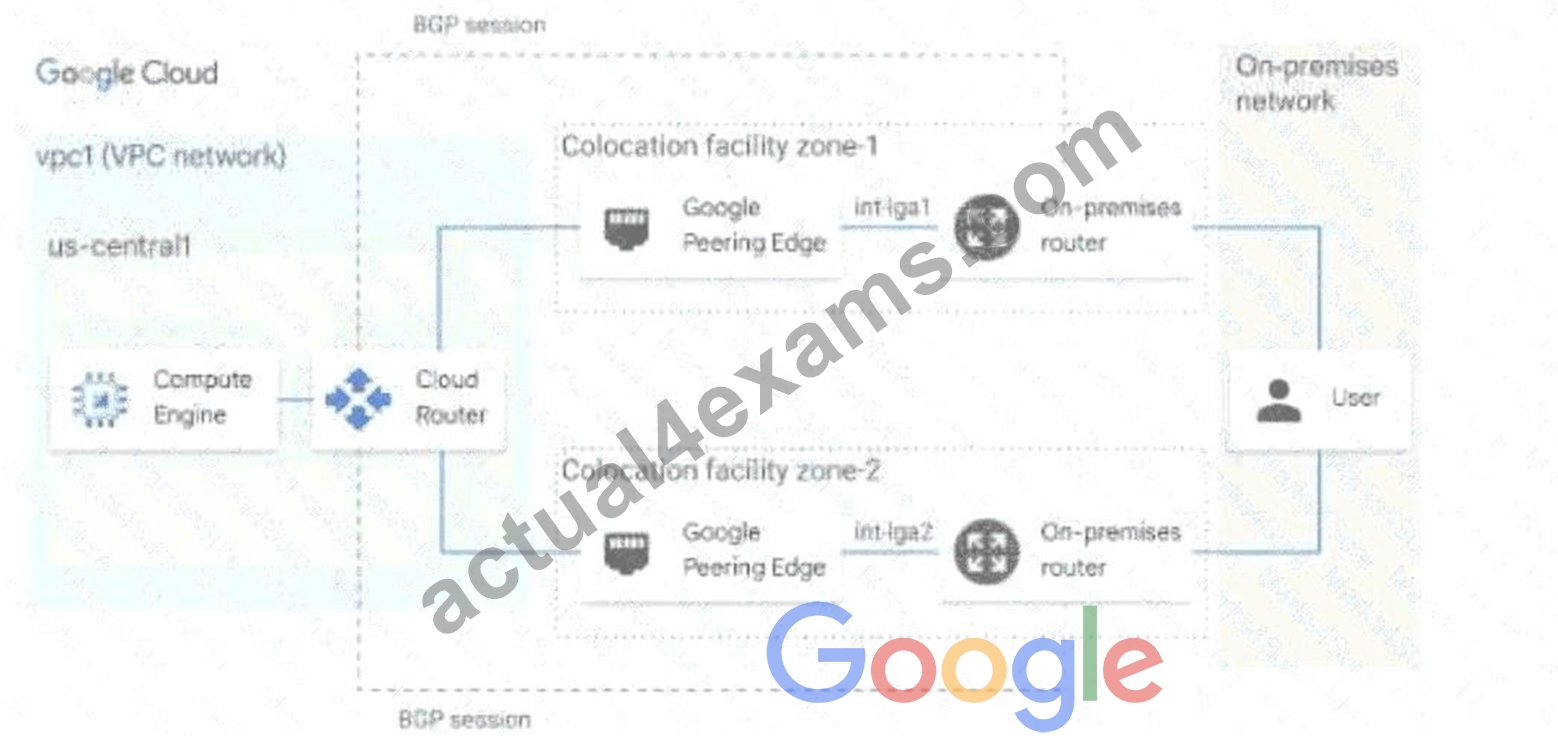
- A. Advertise a lower MED on the passive Interconnect connection from the on-premises router
- B. Configure the advertised route priority as 200 for the BGP session associated with the passive Interconnect connection.
- C. Advertise a lower MED on the active Interconnect connection from the on-premises router
- D. Configure the advertised route priority > 10,200 on the active Interconnect connection.
- E. Configure the advertised route priority as 200 for the BGP session associated with the active Interconnect connection.
Answer: C,E
Explanation:
This answer meets the requirement of configuring one connection as Active for both ingress and egress traffic, and enabling automatic failover to the passive connection in case of failure. The reason is:
* The advertised route priority is a value that Cloud Router uses to set the route priority when advertising routes to your on-premises router. The lower the value, the higher the priority1. By setting the advertised route priority as 200 for the active connection, you ensure that it has a higher priority than the passive connection, which has the default value of 1001. This way, your on-premises router will prefer the routes from the active connection over the passive one for ingress traffic.
* The MED (Multi-Exit Discriminator) is a value that your on-premises router uses to indicate its preference for receiving traffic from Cloud Router. The lower the value, the higher the preference2. By advertising a lower MED on the active connection from your on-premises router, you ensure that Cloud Router will prefer sending traffic to the active connection over the passive one for egress traffic.
* If the active connection fails, Cloud Router will stop receiving routes from it and will start using the routes from the passive connection for egress traffic. Similarly, your on-premises router will stop receiving routes with priority 200 from the active connection and will start using the routes with priority
100 from the passive connection for ingress traffic. This achieves automatic failover without any manual intervention.
Option A is incorrect because setting the advertised route priority > 10,200 on the active connection would deprioritize it globally in your VPC network, which is not what you want1. Option B is incorrect because advertising a lower MED on the passive connection would make Cloud Router prefer sending traffic to it over the active one, which is not what you want2. Option D is incorrect because setting the advertised route priority as 200 for both connections would make them equally preferred by your on-premises router, which is not what you want1.
:
Update the base route priority | Cloud Router | Google Cloud
Configuring BGP sessions | Cloud Router | Google Cloud
NEW QUESTION # 135
You want to set up two Cloud Routers so that one has an active Border Gateway Protocol (BGP) session, and the other one acts as a standby.
Which BGP attribute should you use on your on-premises router?
- A. Community
- B. AS-Path
- C. Multi-exit Discriminator
- D. Local Preference
Answer: C
NEW QUESTION # 136
You are using a third-party next-generation firewall to inspect traffic. You created a custom route of 0.0.0.0/0 to route egress traffic to the firewall. You want to allow your VPC instances without public IP addresses to access the BigQuery and Cloud Pub/Sub APIs, without sending the traffic through the firewall.
Which two actions should you take? (Choose two.)
- A. Create a set of custom static routes to send traffic to the internal IP addresses of Google APIs and services via the default internet gateway.
- B. Create a set of custom static routes to send traffic to the external IP addresses of Google APIs and services via the default internet gateway.
- C. Turn on Private Google Access at the VPC level.
- D. Turn on Private Services Access at the VPC level.
- E. Turn on Private Google Access at the subnet level.
Answer: B,E
NEW QUESTION # 137
You are creating an instance group and need to create a new health check for HTTP(s) load balancing.
Which two methods can you use to accomplish this? (Choose two.)
- A. Create a new legacy health check using the gcloud command line tool.
- B. Create a new legacy health check using the Health checks section in the GCP Console.
- C. Create a new health check using the gcloud command line tool.
- D. Create a new health check using the VPC Network section in the GCP Console.
- E. Create a new health check, or select an existing one, when you complete the load balancer's backend configuration in the GCP Console.
Answer: C,E
Explanation:
https://cloud.google.com/load-balancing/docs/health-checks#creating_and_modifying_health_checks
NEW QUESTION # 138
......
Professional-Cloud-Network-Engineer Exam PDF [2026] Tests Free Updated Today with Correct 236 Questions: https://preptorrent.actual4exams.com/Professional-Cloud-Network-Engineer-real-braindumps.html